 Revapin
How to Delete or Deactivate Your Pinterest Account
Deactivating hides your Pinterest account temporarily and can be undone. Deleting removes it for good, along with every board and pin on it. Know which one you want before you touch the setting, because delete doesn't come back.
Deactivate versus delete
Deactivating takes your profile, boards, and pins out of view. Nobody can find your account while it's off, but your data still exists, and reactivating brings it all back. It's the choice when you want a break or a clean slate for a while. Deleting is the permanent version. The account and everything in it is scheduled for removal, and after that there's nothing to restore. If you're unsure which you mean, you probably want deactivate.
Where the setting lives
Both options sit in your account settings, under the section for account management or changes. You'll usually need to be logged in on the web or the app, confirm your password, and pick a reason before Pinterest lets it go through. Deletion often runs on a delay, so the account may sit in a pending state for a stretch before it's actually gone. During that window you can sometimes change your mind, but don't rely on it.
What happens to your data
When an account is deleted, the boards and pins tied to it go with it. Pins you saved from other people vanish from your side, the boards you built are dismantled, and anything only you had collected is no longer anywhere you can reach. Pinterest may keep some records for its own reasons for a time, but from your point of view the collection is gone. That's the part people underestimate: they're not just closing a login, they're erasing years of saving.
Back up your boards before you delete
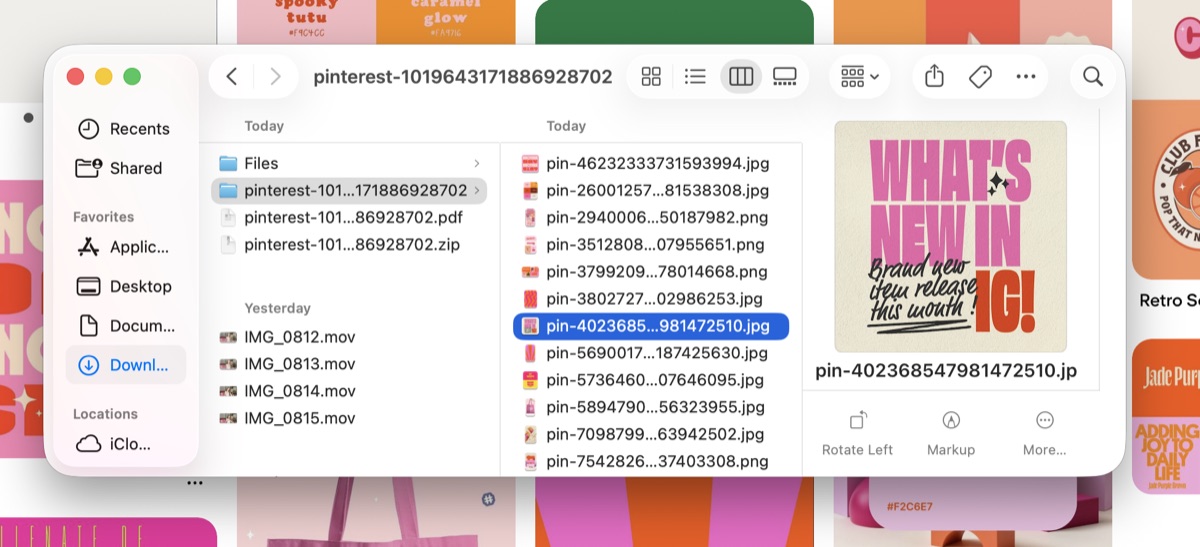
Do this before anything else. If there are boards you'd hate to lose, get them onto your computer while the account still exists, because after deletion there's nothing to recover from. A download extension turns your boards into real files in a few clicks. Revapin saves a board, or your entire profile, to your machine as folders or a ZIP at full resolution, keeping sections separate so your backup mirrors how the boards were arranged — no password required. Run it first, confirm the files are on your drive, then go delete the account with nothing left to regret.
Before you go through with it:
- decide whether you actually want deactivate or delete;
- back up any boards you'd be upset to lose;
- check the files opened on your computer before confirming.
Closing a Pinterest account is quick. Getting the collection back afterward is impossible. Save what matters first, and the decision is a lot easier to live with.
Revapin is not affiliated with, sponsored by, or endorsed by Pinterest. Pinterest is a trademark of Pinterest, Inc.