 Revapin
How to Use Pinterest Templates for Consistent Branding
A pin template is a reusable layout where only the text and photo change while your fonts, colors, and logo stay put. Build a few once and every pin you make afterward looks like it came from the same place. That recognition is what makes people stop on your pin instead of scrolling past it.
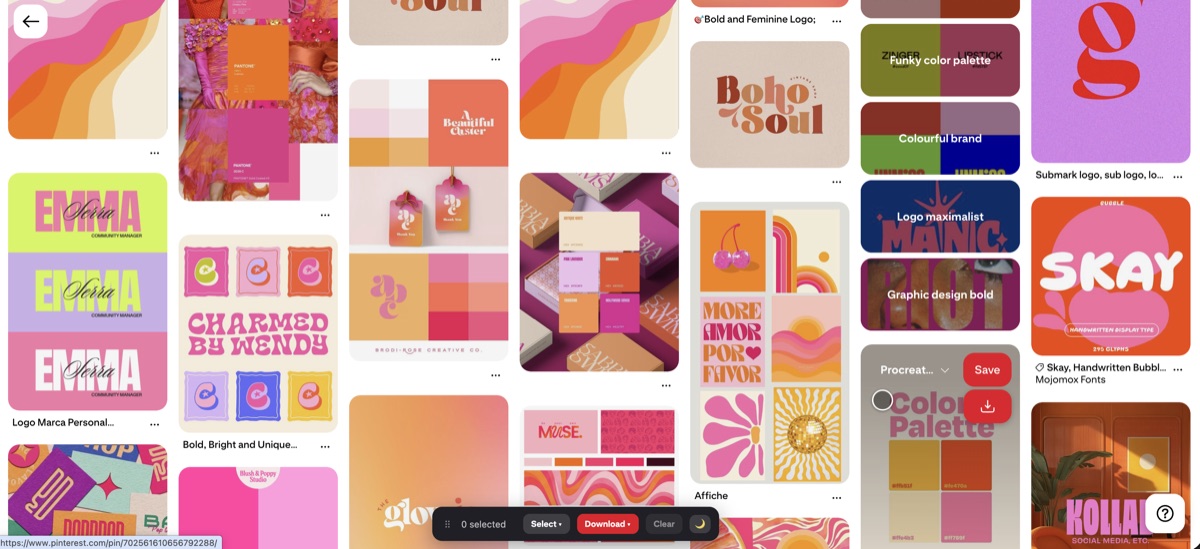
What a template actually fixes
Pick two fonts, a small color palette, and a spot for your logo or site name. Lock those into a layout and save it. From then on you swap the headline and the background image, and everything else holds steady. You stop deciding font and color from scratch every time, which is where most inconsistency creeps in.
Why consistency helps recognition
People scroll fast. When your pins share a look, a regular viewer starts to know your work before they read the name. That familiarity earns clicks over time. A feed of pins in ten different styles reads as ten different accounts, and none of them stick.
Keep your set small
You don't need forty templates. Three or four covers most needs:
- one for recipes or how-to posts with a text bar;
- one for a single strong photo with a small caption;
- one for lists or roundups with a bold headline.
A tight set is faster to work from and easier to keep on-brand.
Study how others hold a look
The fastest way to learn what consistent branding looks like is to gather pins from accounts that do it well and lay them side by side. Revapin downloads competitor pins into a folder, so you can pull a dozen from one brand and see exactly how they reuse fonts, colors, and layout across posts, then build your own templates from what works.
Set your fonts and colors, save a handful of layouts, and reuse them. The goal isn't to look fancy, it's to look like you every single time, so a viewer knows your pin the moment it appears.
Revapin is not affiliated with, sponsored by, or endorsed by Pinterest. Pinterest is a trademark of Pinterest, Inc.